
How Do I Pay My CFE Bill?
Here are the ways to pay your CFE electricity bill, including Xoom, CFE's own online services, CFEmáticos, authorized stores and Mexican banks.
 Reviewed for Accuracy
 Last Verified: October 23, 2026
 No Login. Just Answers.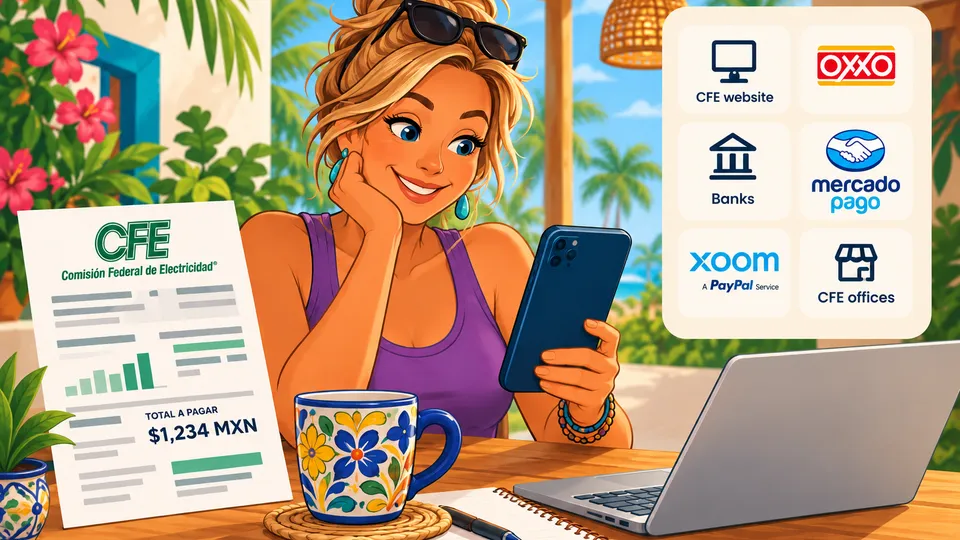
 Quick Answer
 You have several ways to pay your CFE electricity bill.
If you don't have a Mexican bank account, one useful option for many foreign residents is Xoom by PayPal, which currently lists CFE as a supported biller in Mexico.
You can also pay directly with CFE online through MiCFE or the CFE Contigo app, at a CFEmático, or at an authorized bank, shop or convenience store.
The Simple Rule
You do not need a Mexican bank account just to pay your CFE bill.
Pay or Manage Online
Use these verified CFE destinations instead of searching for a payment page or app. CFE has warned customers about unofficial websites, so it's safest to start from a link you know is real.
Which Payment Option Is Best for Me?
There isn't one best method for everyone. It depends on whether you have Mexican banking, which payment methods you have, and whether you'd rather pay online or in person.
- No Mexican bank account
- Start with Xoom by PayPal.
- Want to pay CFE directly online
- Use MiCFE or the CFE Contigo app.
- Prefer paying in person
- Go to a CFEmático or an authorized payment location.
- Have Mexican online banking
- Check your bank's CFE bill-payment option.
Option 1: Pay CFE with Xoom by PayPal
For many foreign residents, this is an option worth knowing about. Xoom offers bill payment in Mexico and lists CFE among the companies you can pay.
- 1. Sign in to your Xoom account and start a bill payment to Mexico.
- 2. Choose CFE as the company you're paying.
- 3. Enter the account information Xoom asks for, using your CFE bill.
- 4. Enter the amount you want to pay and choose one of the funding methods Xoom offers your account.
- 5. Carefully check the CFE account information, the amount and any fee shown.
- 6. Submit the payment and save your confirmation.
Xoom is not a CFE app.
It's a separate payment service from PayPal that currently supports CFE bill payments in Mexico.
Does Xoom charge a fee?
It can. Xoom says fees and limitations apply, and it shows you the fee before you send. Check the amount Xoom shows before you complete the payment.
Option 2: Pay with Mercado Pago
If you use the Mercado Pago app, you can pay your CFE bill there too, without visiting a CFE office or a store.
- 1. Open the Mercado Pago app.
- 2. Tap Pagar servicio (Pay a bill).
- 3. Search for CFE.
- 4. Scan the barcode on your bill or type in the reference number.
- 5. Check the amount due and choose your payment method.
- 6. Confirm the payment and save the digital receipt.
Mercado Pago is not a CFE app.
It's a separate payment app from Mercado Libre that supports CFE bill payments.
Good to know
Mercado Pago says paying from your Mercado Pago account balance has no fee. Paying with a linked debit or credit card adds a small fee, so check the total before you confirm.
Option 3: Pay Directly Through CFE
Once you register on MiCFE, CFE's customer portal, you can check your balance and bill, pay online, report outages and request a meter review.
CFE also has an official app, CFE Contigo, for iPhone, Android and Huawei phones. Both links are in the box above.
What about a foreign credit or debit card?
Some foreign cards may work, but there's no official confirmation that every U.S., Canadian or other foreign-issued card is accepted. If your card isn't accepted, try another option on this page.
Option 4: Pay at a CFEmático
If you'd rather pay CFE directly in person, CFEmáticos are CFE's self-service payment machines. Keep the receipt after you pay.
Option 6: Pay Through a Mexican Bank
If you have a Mexican bank account, your bank may let you pay CFE through its app or online banking. The steps depend on the bank. You don't need a Mexican bank account just to pay CFE, though.
What Information Do I Need From My CFE Bill?
Have your current CFE bill handy before you start. The most important number is your número de servicio (service number), printed at the top right of the bill. If the account isn't in your name, ask the owner, property manager or host for it.
What If My CFE Bill Is Already Overdue?
Don't assume every payment method works the same way once a bill is overdue or your service is at risk of being cut off. Pay through one of CFE's own channels if you can, and keep your proof of payment.
How Do I Know My Payment Went Through?
Always save your proof of payment. Depending on how you paid, that might be a digital confirmation, a transaction number, an email, a screenshot, a bank transaction or a printed receipt.
Take a photo of paper receipts
A digital copy of a printed CFE receipt gives you something to show if you ever need to trace a payment.
Be Careful With Fake CFE Payment Requests
CFE has warned about websites that pretend to be CFE so they can steal personal information, including unofficial sites that offer to “check your bill.” CFE says it never asks for bank information through advertising campaigns.
Pay only through CFE's official channels (its website, MiCFE, the CFE Contigo app, CFEmáticos and authorized locations) or a payment service you chose yourself, like Xoom.
Useful Spanish
- Quiero pagar mi recibo de luz.KYEH-roh pah-GAR mee reh-SEE-boh deh loosI want to pay my electricity bill.
- ¿Puedo pagar con tarjeta?PWEH-doh pah-GAR kohn tar-HEH-tahCan I pay by card?
- ¿Dónde puedo pagar mi recibo de CFE?DOHN-deh PWEH-doh pah-GAR mee reh-SEE-boh deh seh-eh-feh-EHWhere can I pay my CFE bill?
- Ya pagué.yah pah-GEHI already paid.
- Aquí está mi comprobante de pago.ah-KEE ehs-TAH mee kohm-proh-BAHN-teh deh PAH-gohHere is my proof of payment.
- ¿Cuándo se refleja el pago?KWAHN-doh seh reh-FLEH-hah ehl PAH-gohWhen will the payment show up on my account?
 Frequently Asked Questions
Do I need a Mexican bank account to pay my CFE bill?
No. You can pay through CFE's MiCFE portal or the CFE Contigo app, at a CFEmático or an authorized location, or with a payment service such as Xoom by PayPal, which lists CFE as a supported biller in Mexico.
Can I pay my CFE bill with Xoom?
Yes. Xoom's Mexico bill-pay service lists CFE among its billers. Xoom is a separate company, not CFE, and it says fees and limitations apply, so check the fee it shows before you send the payment.
Can I pay my CFE bill with Mercado Pago?
Yes. In the Mercado Pago app, tap Pagar servicio, search for CFE, then scan your bill's barcode or type in the reference number. Mercado Pago says paying from your account balance has no fee, while a linked card adds a small fee.
Can I pay CFE online?
Yes. Registered users can pay through MiCFE, CFE's customer portal, or the official CFE Contigo app for iPhone, Android and Huawei phones.
Will my U.S. or Canadian card work for CFE payments?
It might, but there's no official confirmation that every foreign-issued card is accepted. If your card is declined, use another option, such as Xoom, a CFEmático or an authorized payment location.
Where do I find my CFE service number?
Your número de servicio (service number) is printed at the top right of your CFE bill. If the account isn't in your name, ask the owner, property manager or host for it.
How do I avoid fake CFE payment sites?
Use links you know are real, like the official CFE links in this article. CFE has warned about unofficial sites that pretend to be CFE to steal personal information, and it says it never asks for bank information through advertising campaigns.
 Sources
- CFE: MiCFE customer portal (check your bill, pay online, report outages)
- CFE: Where to pay (CFEmáticos, banks, shops and convenience stores)
- CFE: Press bulletin CFE-BP-54-23 on fraud and official channels (May 3, 2023)
- CFE Contigo on the App Store
- CFE Contigo on Google Play
- Xoom: Pay bills in Mexico (lists CFE; fees and limitations apply)
- Mercado Pago: How to pay bills from the app (lists CFE; fees, July 7, 2026)

Was This Helpful?