
Power Outages in Playa del Carmen
Power outages happen often enough in Playa that it's worth knowing what to do before you're sitting in a hot, dark house with a dying phone. Here's how to figure out what's wrong, report an outage to CFE, protect your food and electronics, deal with heat and water problems, and prepare for the next one.
 Reviewed for Accuracy
 Last Verified: October 6, 2026
 No Login. Just Answers.
 Quick Answer
If the power goes out, first figure out whether it's just your home or building, or a larger CFE outage. Check your breakers safely, look outside or ask neighbors whether they also lost power, and report a CFE outage when appropriate.
Then switch into outage mode: keep the refrigerator and freezer closed, protect sensitive electronics, conserve your phone battery, make sure you have light and airflow, and check whether your home's water system, internet, gates or other equipment also depend on electricity.
If you live in Playa, don't wait for an outage to prepare. Keep power banks, rechargeable lights and fans charged, and know where your CFE service information is.
The Simple Rule
First find out: is it just me, or is everyone out? That answer decides what you do next. A CFE area outage and an electrical problem inside your own home are not the same thing.
The First Five Minutes
Power outages in Playa can come from storms and weather, equipment problems, local electrical faults, maintenance work, wider grid problems, or something that only affects your building or home. Here's what to do first.
- 1. Look outside. Are the streetlights, common-area lights, neighboring homes or nearby businesses dark? Darkness alone doesn't prove it's a CFE outage, but it's a strong clue.
- 2. Ask a neighbor. It's often the fastest reality check: “¿Tienes luz?” — “Do you have power?”
- 3. Check your breakers, safely. If only your home seems affected, look at your breaker box (centro de carga) to see whether a breaker has tripped. Don't open electrical equipment, touch the meter or work on wiring. If resetting a breaker doesn't fix it, or it trips again, call an electrician, your property manager or your host.
- 4. Make sure it isn't a disconnection. If a bill went unpaid, your service may have been suspended rather than interrupted by an outage. CFE doesn't treat a suspension for nonpayment as an outage report.
- 5. Report it to CFE when appropriate. If it looks like more than just your home, report the outage (see below).
Is It CFE or Just My House?
These are clues, not absolute proof, but they'll point you in the right direction.
Probably a larger outage
- Your neighbors are also out
- Common areas in your building are out
- Streetlights are out
- Several nearby buildings are dark
Possibly just your home
- Your neighbors still have electricity
- Common-area lights still work
- Only part of your home lost power
- A breaker is tripped
- Something inside your home failed
If it's only your home
If basic, safe checks don't fix it, contact a qualified electrician or your property manager rather than repeatedly reporting an area outage. CFE says it won't process an outage report when the cause is a fault inside the home.
Renting short-term? Contact your host or property manager. In a condo? Contact building administration or security.
How to Report an Outage to CFE
CFE (Comisión Federal de Electricidad) is the electricity company in Playa. Reporting an outage is free. CFE's official channels for a “no luz” report are:
- Call 071, CFE's customer service line.
- The CFE Contigo app (Android and iOS).
- Online at cfe.mx.
- In person at a CFE customer service center (Centro de Atención a Clientes).
What information should I have?
CFE asks for some information that identifies your service. According to CFE, any one of these can work: número de servicio (service number), número de cuenta (account number), meter number (número de medidor), the service address, the account holder's name, or a telephone number.
The service number is printed at the top right of your CFE bill. When you call 071, also be ready to give your full address with cross streets and a reference point.
To follow up on a report, call 071 or visit a CFE customer service center.
Only use CFE's official channels. Don't rely on numbers posted in social media groups.
Save This Before the Next Outage
Nobody wants to discover in the middle of an outage that they have no idea what their service number is. Save these now:
- Your CFE service number (número de servicio)
- A photo or PDF of a recent CFE bill
- Your meter number, if you know it
- Your full service address, with cross streets
- Your property manager, HOA or host contact
- An electrician's contact, if you own your home
- CFE's reporting options: 071, the CFE Contigo app and cfe.mx
Keep it somewhere you can reach offline
Don't store critical information only somewhere that disappears when the internet or power is down. A screenshot or an offline note on your phone works well.
Renting? If the CFE account isn't in your name and you don't have the bill, ask the owner, property manager or host for the service number now. For paying the bill itself, see How do I pay my CFE bill?
What Does “Se Fue la Luz” Mean?
In Mexico you'll often hear “Se fue la luz” — “The power went out”. Literally it sounds like “the light went away,” but in everyday conversation luz means the electricity.
You'll also hear “No hay luz.” — “There's no power.”
Keep the Refrigerator and Freezer Closed
Don't keep opening the door to check. Every time you open it, cold air escapes. According to FoodSafety.gov, if the doors stay closed:
Refrigerator
- Keeps food safe for about 4 hours
Full freezer
- Holds a safe temperature for about 48 hours
Half-full freezer
- Holds a safe temperature for about 24 hours
When in doubt, throw it out
A refrigerator/freezer thermometer is extremely useful, because it tells you what actually happened instead of leaving you to guess.
U.S. food-safety guidance says to throw out refrigerated perishable food (meat, poultry, fish, eggs, leftovers) after 4 hours without power. Frozen food can be refrozen if it still has ice crystals or is at 40°F (4°C) or below.
Never taste food to decide whether it's safe, and don't rely on how it looks or smells. Use the FoodSafety.gov charts for specific foods.
Playa Heat Changes the Experience
An outage in Playa isn't just “the lights are off.” The immediate problem is often no air conditioning and no fans, in tropical heat and humidity.
- Use battery or rechargeable fans.
- Stay hydrated.
- Close curtains or blinds on sun-facing windows.
- Wear lightweight clothing and use cool, wet cloths.
- Move to the coolest, shadiest part of your home.
- If the outage drags on, spend the hottest part of the day somewhere with working power and air conditioning.
- If someone shows signs of heat illness, or has a medical condition that makes heat dangerous, get medical help. In an emergency, call 911.
Your Water May Stop Too
A lot of newcomers are surprised by this one: “The electricity is out. Why did my water stop?”
Many homes and developments in Playa use an electric pump to move water from storage (like an underground cisterna) to the faucets, or to fill a rooftop tinaco. Depending on how your property is set up, an outage can mean lower water pressure, no water pressure, or tanks that can't be refilled normally.
Not every home loses water. If your home has a tinaco, water may keep flowing by gravity until that tank runs low. If it relies on a pressure pump, pressure can drop as soon as the power goes. That's one reason it's worth keeping some drinking water stored and knowing how your property's water system works.
One possible setup (yours may be different)

Cisterna
stores water

Pump
needs electricity

Tinaco
rooftop tank

Your faucet
water pressure
Know Your Home's Water System
If you live here, learn these before an outage (your landlord, HOA or property manager can tell you). For more on how water reaches your faucet, see Can I drink the tap water in Playa del Carmen?
- Does the property have a cisterna?
- Does it have a tinaco?
- Is there a pressure pump (hidroneumático)?
- Which parts need electricity?
- Does the building have backup power for the pumps?
- Does anything need to be restarted after the power returns?
Internet May Go Down, or May Not
Your internet can stop simply because your modem, router or mesh system has no electricity, or because the provider's own equipment is affected.
A small UPS (battery backup) for your networking equipment can keep it running for a while, but it only helps if your provider's network is still up. It doesn't guarantee internet during an area outage. Mobile data may become important, though cell networks can be affected too.
If you work online from Playa, plan for outages: keep your laptop charged, have a power bank that can handle your devices, know how to use your phone as a hotspot, consider a UPS for your router or a portable power station, and have a backup place to work if an outage drags on.
Gates, Building Access and Elevators
 Know how you get in and out before the power fails. Ask your landlord, HOA or building administration how the pedestrian gate works without power, whether the vehicle gate or garage door has a manual release, and whether the building's access system has backup power.
In a condo or high-rise, never assume the elevators will keep working. Whether a building has generator backup varies.
If you're ever trapped in an elevator, use its alarm or intercom and follow the building's emergency procedures. In an emergency, call 911. Don't force the doors or try to climb out.
Protect Your Electronics
Outages, and the moment power comes back, can come with electrical disturbances. Use surge protection for sensitive electronics such as TVs, computers, networking equipment, entertainment and smart-home devices, and appliances you care about.
During a longer outage, it's reasonable to unplug sensitive or nonessential electronics where that's safe and easy. When the power returns, don't assume it's stable right away. Wait a little, then reconnect things gradually.
Leave electrical panels and wiring to a qualified electrician.
Why Don't My Solar Panels Keep the House On?
This surprises a lot of homeowners. Having solar panels does not automatically mean your house has power during a CFE outage.
Many standard grid-tied solar systems shut down when the grid goes down. This protects utility workers and keeps solar power from energizing lines that are supposed to be dead.
To power a home during an outage, a system generally needs equipment designed and set up for backup, such as batteries, a compatible inverter with backup capability, and equipment that safely separates the home from the grid.
Solar ≠ backup power
Ask your solar installer exactly what your system does when CFE goes down, and what it does when power comes back.
Portable Power Stations
A portable power station is a rechargeable battery with built-in outlets. Depending on its capacity and output, it can charge or run phones, fans, lights, laptops, routers and some small appliances.
Don't assume a power station can run a refrigerator, a mini-split air conditioner, a water pump or a whole house. Capacity and each device's power needs matter. For large loads, get proper sizing advice.
Generators: Never Indoors
Generators can help, but they produce carbon monoxide (CO), a gas you can't see or smell that can kill.
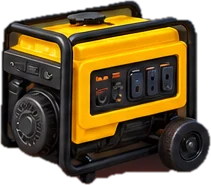
Generator safety
Never run a generator inside: not in the house, garage, basement or an enclosed patio, even with doors and windows open.
The CDC says to run it outdoors, at least 20 feet (about 6 meters) from doors, windows and vents.
When using a generator or other fuel-burning backup equipment, use a battery-powered or battery-backup carbon monoxide detector in your home.
Never connect a generator to your home's wiring yourself. A permanent generator and its transfer equipment should be installed by a qualified professional.
Light and Your Phone Battery
For light, rechargeable lanterns, flashlights and headlamps are the best choice, with your phone's flashlight as a backup. Candles are a fire risk, so don't make them your main plan.
Don't burn through your phone battery in the first hour. Lower the screen brightness, turn on low-power mode, skip video and streaming, and keep power banks charged. You can charge from a car if it's safe, but never run a car in an enclosed garage.
Pool Equipment and Air Conditioners
During an outage the pool pump stops, and depending on the equipment, timers or controllers may lose their settings. When power comes back, check that the pool equipment restarted normally.
Don't assume every mini-split comes back on exactly as before. Check that each unit is running normally, and avoid switching equipment on and off repeatedly while the service is unstable.
What to Check When the Power Comes Back
Don't just celebrate and walk away. When CFE service comes back, not every system in your home automatically restarts. Check:
- Is the electricity actually stable?
- Are your breakers still normal?
- Did the refrigerator and freezer restart?
- Did the air conditioning restart?
- Did your internet equipment restart?
- Did the water or pressure pump restart?
- Did the pool equipment restart?
- Did the gate and access equipment restart?
- Did clocks and timers reset?
- Is any surge protector or device showing a problem?
- Solar homeowners: is the solar/inverter system back to its normal operating state?
Power's back, but something still doesn't work?
The problem may be a breaker, a pump controller, the router, an air conditioner, an appliance, the pool controller, a gate motor, a solar inverter or simply its settings. If it needs electrical repair, contact the right professional.
How Long Will the Outage Last?
Nobody can promise you a restoration time. A real outage depends on its cause, how large an area is affected, the weather, equipment damage and access for crews.
CFE's published procedure for “no luz” reports sets maximum response times in urban areas: up to 10 hours for an individual report, and up to 4 hours when a whole sector is out. Those are CFE's targets for responding, not a guarantee of when your lights come back.
To check on a report, call 071 or visit a CFE customer service center.
What If It's Been Out for Hours?
Take stock without panicking:
- Phone battery
- Food temperature
- Drinking water
- Heat
- Medications that need refrigeration
- Pets
- Anyone with mobility needs or medical equipment
- Whether you can get in and out of the property
- Internet and work needs
Medical needs and pets
If you depend on electrically powered medical equipment, have an outage plan made for that specific equipment. For medication that needs refrigeration, follow the manufacturer's or your pharmacist's storage guidance rather than general refrigerator rules.
Heat affects pets too. Make sure they have water and ventilation, and never leave them in a hot, closed space.
If staying in the property is becoming unsafe or impractical, go somewhere with working power.
Your Playa Power-Outage Kit
The best time to prepare is before the next outage. A basic kit:
- Charged power banks, plus the right charging cables
- Rechargeable or USB fans
- Rechargeable lanterns, flashlights or headlamps
- Spare batteries where needed
- A refrigerator/freezer thermometer
- Stored drinking water
- A car charger
- Your CFE service number and a recent bill, saved offline
- Property manager, HOA, host or electrician contacts
- Surge protection for sensitive electronics
- A small UPS for your internet equipment, if useful to you
- A portable power station, if it fits your household's needs
- A battery-powered or battery-backup CO detector, if you use a generator or other fuel-burning backup equipment
Before hurricane season
Outages aren't only a hurricane problem, but the start of storm season (June 1) is a good yearly reminder: charge power banks, test fans, lanterns and flashlights, check batteries and your power station, check the fridge thermometer, review generator safety, save your CFE info, learn how your water pump works and how the gates open without power, and know where your emergency supplies are.
Useful Spanish
Tap the speaker next to a phrase to hear it.
- “Se fue la luz” — “The power went out”
- “No hay luz.” — “There's no power.”
- “¿Tienes luz?” — “Do you have power?”
- “¿También se fue la luz en tu casa?” — “Did your power go out too?”
- “No tenemos electricidad.” — “We don't have electricity.”
- “¿Sabes qué pasó?” — “Do you know what happened?”
- “¿Ya reportaste la falla?” — “Did you already report the outage?”
- “Quiero reportar una falla de luz.” — “I want to report a power outage.”
- “Mi número de servicio es…” — “My service number is…”
- “No tenemos agua.” — “We don't have water.”
- “¿Funciona la bomba de agua?” — “Is the water pump working?”
- “¿Cuándo regresa la luz?” — “When will the power come back?” (Asking doesn't mean anyone actually knows.)
Common Newcomer Mistakes
- Assuming every outage is a CFE problem
- Not knowing where the breakers are
- Not saving the CFE service number
- Opening the refrigerator again and again
- Waiting until an outage to charge power banks
- Having no battery fan in Playa's heat
- Assuming the water will keep working normally
- Assuming the internet will keep working
- Not knowing how an electric gate works without power
- Assuming solar panels mean the house stays powered
- Assuming every system restarts on its own when power returns
- Plugging sensitive equipment back in the moment power returns
- Running a generator too close to the house
- Using a generator in a garage, patio or any enclosed space
- Waiting until a storm is coming to prepare
 Frequently Asked Questions
Are power outages common in Playa del Carmen?
They happen often enough that residents should be prepared for them. Outages can come from storms, equipment problems, local faults, maintenance or problems that only affect one building or home. Having charged power banks, a battery fan, rechargeable lights and your CFE service number saved makes a big difference.
How do I report a power outage to CFE?
Use CFE's official channels: call 071, use the CFE Contigo app, report online at cfe.mx, or visit a CFE customer service center. Reporting is free. Have something that identifies your service, such as your número de servicio from your CFE bill, plus your full address.
What number do I call for CFE?
071 is CFE's customer service number for reporting an outage and following up on a report.
How do I know whether the outage is CFE or just my house?
Look outside and ask a neighbor. If neighbors, streetlights and common areas are also out, it's probably a larger outage, so report it to CFE. If neighbors and common areas still have power, check your breakers safely. If that doesn't fix it, contact an electrician, your property manager or your host. CFE won't process an outage report for a fault inside the home.
Why did my water stop when the electricity went out?
Many Playa homes use an electric pump to move water from a cisterna to the faucets or to fill a rooftop tinaco. When the power goes out, that pump stops, so you can lose some or all of your water pressure. It depends on your property's setup: a home with a tinaco may keep getting water by gravity until the tank runs low.
How long will food stay safe in my refrigerator?
According to FoodSafety.gov, about 4 hours if the refrigerator stays closed. A full freezer holds a safe temperature for about 48 hours, and a half-full freezer for about 24 hours. Throw out refrigerated perishable food after 4 hours without power, and never taste food to decide whether it's safe.
Why don't my solar panels work during an outage?
Many standard grid-tied solar systems shut down when the grid goes down, to protect utility workers. To power your home during an outage, a system generally needs equipment designed for backup, such as batteries and a compatible inverter. Ask your solar installer what your system does.
Will my internet work during a power outage?
It depends. Your modem and router need electricity, and your provider's equipment may also be affected. A small UPS can keep your own equipment running for a while if the provider's network is still up, but it can't guarantee internet. Mobile data can be a backup.
Should I unplug electronics during an outage?
During a longer outage, it's reasonable to unplug sensitive or nonessential electronics where it's safe and easy. Use surge protection, and when power returns, wait a little and reconnect things gradually.
Can I use a generator?
Yes, but only outdoors. The CDC says never to use a generator inside a home, basement or garage, and to keep it at least 20 feet (about 6 meters) from doors, windows and vents because of carbon monoxide. Use a battery-powered or battery-backup CO detector, and have any permanent generator connection installed by a professional.
What should I buy for power outages in Playa?
Start with charged power banks and cables, rechargeable or USB fans, rechargeable lanterns or flashlights, a refrigerator/freezer thermometer, stored drinking water, a car charger and surge protection. Depending on your household, a small UPS for your router or a portable power station can also help.
What should I check when the electricity comes back?
Check that the power is stable, then confirm your breakers, refrigerator and freezer, air conditioning, internet equipment, water pump, pool equipment, gates, clocks and timers, surge protectors and any solar system all came back normally.
 Sources
- CFE: Reporte de No Luz (channels, required information and response times)
- CFE: Reporte de fallas en el suministro de energía eléctrica
- FoodSafety.gov: Food Safety During a Power Outage
- CDC: What to Do to Protect Yourself During a Power Outage
- CDC: Avoiding Carbon Monoxide Poisoning
- Enphase: What happens when the power goes out in a grid-tied solar system (anti-islanding)

Was This Helpful?