
How Do I Pay My Aguakan Water Bill?
Here's how to pay your Aguakan water bill online, in the app or in person, and what you'll need from your bill.
 Reviewed for Accuracy
 Last Verified: October 23, 2026
 No Login. Just Answers.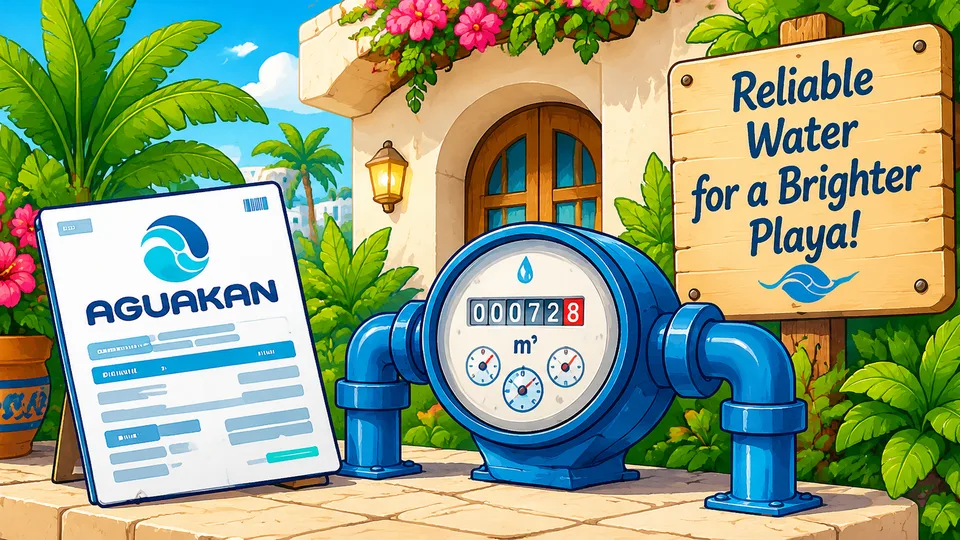
 Quick Answer
 The easiest way to pay your Aguakan bill online is Pago Express.
You don't need an Aguakan account. Have your bill handy: you'll need your número de cliente (customer number) and your NIA, plus your name, email and phone number. Pago Express takes Visa and Mastercard.
You can also pay through Aguakan's Oficina Virtual, the Aguakan app, Mercado Pago, an Aguakan payment machine or office, or stores like OXXO, Walmart and Chedraui.
The Simple Rule
For a quick online payment, start with Pago Express. No Aguakan account is required.
Pay or Manage Online
Use these verified Aguakan links instead of searching for a payment page or app.
What Do I Need From My Aguakan Bill?
Have your Aguakan bill (recibo) handy. Pago Express asks for your name, email address and phone number, plus two numbers from the bill. If the account isn't in your name, ask the owner, property manager or host for the bill.
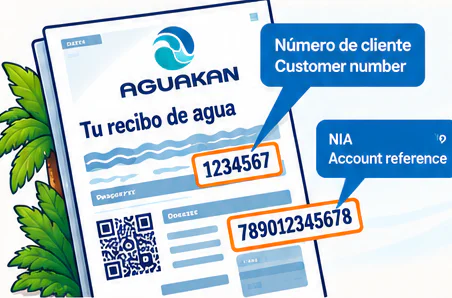
- Número de cliente (customer number): printed as CLIENTE near the top left of the bill.
- NIA: a longer reference code a few lines below it.
Option 1: Pay With Pago Express
Best if you just want to pay the bill without creating an account.
- 1. Open Pago Express (the link is in the box above).
- 2. Enter your name, email address and phone number.
- 3. Enter the número de cliente and the NIA from your bill.
- 4. Continue so Aguakan can find your account.
- 5. Check that the account and amount shown match your bill.
- 6. Pay with a Visa or Mastercard card.
- 7. Save your payment confirmation.
Ask Playa Tip
Keep your confirmation (a screenshot or the email) until the payment shows on your Aguakan account.
Option 2: Use Aguakan's Oficina Virtual
If you live in Playa and will pay every month, an account on Oficina Virtual, Aguakan's customer site, may be handier. Create a user, sign in, open the Pagos tab, choose the bill and follow the steps. When you register, Aguakan also offers a digital bill.
Can I set up automatic payments?
Aguakan's website doesn't describe automatic payments for each new bill, so don't count on it. Ask Aguakan directly if you'd like that option.
Option 3: Pay With the Aguakan App
Aguakan's official app (Aguakan Móvil) is on iPhone and Android, with links in the box above. Its store listing says you can pay by debit or credit card, check your water use, report a problem, get maintenance alerts and find payment centers.
Good to know
The App Store shows the app was last updated in December 2020. If it gives you trouble, use Pago Express instead.
Option 4: Pay With Mercado Pago
Aguakan lists Mercado Pago among the apps you can pay your water bill with. In the app, tap Pagar servicio (Pay a bill), search for Aguakan, and follow the steps with your bill in hand. Save the digital receipt when you're done.
Mercado Pago is not an Aguakan app.
It's a separate payment app from Mercado Libre. Aguakan lists it as a way to pay.
Good to know
Mercado Pago says paying bills from your Mercado Pago balance has no fee, while a linked debit or credit card adds a small fee. Check the total before you confirm.
Option 5: Pay at an Aguakan Payment Machine
Aguakan has self-service payment machines (cajeros) that take credit and debit cards. In Playa they're at its Cruz de Servicios and Villas del Sol offices.
Official Aguakan link
Option 6: Pay at an Aguakan Office
Aguakan has four offices in Playa del Carmen with payment windows (cajas). Hours can change, so check Aguakan's list before you go.
Official Aguakan link
- Cruz de Servicios
- Av. Kantenah, SM 53. Monday to Friday, 8 a.m. to 5 p.m. Also handles billing questions and payment plans until 3 p.m.
- Villas del Sol
- Av. de los Gavilanes, between Av. Loros and Av. Pavo Real. Monday to Friday, 8 a.m. to 5 p.m.
- Colosio
- Av. 35, between Calles 76 and 78. Payments only. Monday to Friday, 8 a.m. to 5 p.m.
- Las Perlas (Centro)
- Av. Constituyentes 180, between Calles 20 and 20 Bis. Monday to Friday, 9 a.m. to 1:30 p.m. and 2 to 5 p.m.
Option 7: Pay at a Store, Pharmacy or Bank
Aguakan lists these places in Playa del Carmen where you can pay your water bill. Bring the bill, and keep your receipt until the payment shows on your account.
- Supermarkets
- Soriana, Walmart, Bodega Aurrera, Mi Bodega Aurrera, Chedraui, Sam's Club
- Convenience stores
- OXXO, 7-Eleven, Circle K, Go Mart, Tiendas Six
- Pharmacies
- Farmacias del Ahorro, Farmacias Yza, Farmacias Bazar
- Banks
- Santander, HSBC
What If I Paid but My Account Still Shows a Balance?
Keep your receipt or confirmation, then contact Aguakan. Its help line, 073, is open 24 hours for billing and payment problems. You can also call its Playa del Carmen office line, (984) 873 0145, or take your receipt to an Aguakan office. Cruz de Servicios handles billing questions (aclaraciones) from 8 a.m. to 3 p.m.
Keep your proof of payment
A receipt, screenshot, transaction confirmation or email gives Aguakan something to trace if a payment goes missing.
What If My Water Was Already Cut Off?
If your service was suspended for nonpayment, paying the balance doesn't automatically turn the water back on. Pay, keep your receipt, and contact Aguakan to ask about reconnection. Procedures and fees can change, so get the current details from Aguakan.
Can I Pay Aguakan With Xoom?
Not as far as we can tell. Xoom's Mexico bill-pay page lists CFE, but not Aguakan, and Aguakan doesn't list Xoom. Use one of the options above instead.
Useful Spanish
- Quiero pagar mi recibo de agua.KYEH-roh pah-GAR mee reh-SEE-boh deh AH-gwahI want to pay my water bill.
- ¿Dónde está mi número de cliente?DOHN-deh ehs-TAH mee NOO-meh-roh deh klee-EHN-tehWhere is my customer number?
- Ya pagué.yah pah-GEHI already paid.
- El pago todavía no aparece.ehl PAH-goh toh-dah-BEE-ah noh ah-pah-REH-sehThe payment still isn't showing.
- Aquí está mi comprobante de pago.ah-KEE ehs-TAH mee kohm-proh-BAHN-teh deh PAH-gohHere is my proof of payment.
 Frequently Asked Questions
Do I need an Aguakan account to pay my water bill online?
No. Aguakan's Pago Express lets you pay without an account. You need the número de cliente and NIA from your bill, plus your name, email and phone number.
Where do I find my número de cliente and NIA?
Both are on your Aguakan bill. The número de cliente is printed as CLIENTE near the top left, and the NIA is a few lines below it.
Which cards does Pago Express accept?
Pago Express shows Visa and Mastercard as its payment methods.
Can I pay my Aguakan bill in person in Playa del Carmen?
Yes. Aguakan has payment windows at its Cruz de Servicios, Villas del Sol, Colosio and Las Perlas offices, and card payment machines at Cruz de Servicios and Villas del Sol. Check Aguakan's website for current hours before you go.
Can I pay my Aguakan bill with Mercado Pago or at OXXO?
Yes. Aguakan lists Mercado Pago among the apps you can pay with (tap Pagar servicio and search for Aguakan), and lists OXXO, 7-Eleven, Walmart, Chedraui, Soriana and other stores, pharmacies and banks in Playa del Carmen.
Can I set up automatic payments for Aguakan?
Aguakan's website doesn't describe automatic payments for each new bill. Ask Aguakan directly if you'd like that option.
Can I pay Aguakan with Xoom?
Xoom's Mexico bill-pay page lists CFE but not Aguakan, and Aguakan doesn't list Xoom. Use Pago Express, the Aguakan app, Mercado Pago or an in-person option instead.
What do I do if my payment isn't showing?
Keep your receipt or confirmation and contact Aguakan: its 24-hour help line is 073, its Playa del Carmen office line is (984) 873 0145, or you can take the receipt to an Aguakan office.
 Sources
- Aguakan: Pago Express (online payment, no account needed)
- Aguakan: Oficina Virtual sign-in
- Aguakan: Offices and payment windows, incl. Playa del Carmen (reviewed Aug 2026)
- Aguakan: Payment machines (cajeros automáticos), Aug 2026
- Aguakan: Pago presencial: banks, stores and offices where you can pay (June 29, 2026)
- Aguakan: How to pay your water bill in 2026 (lists Mercado Pago and the 073 line, March 1, 2026)
- Mercado Pago: How to pay bills from the app (fees, July 7, 2026)
- Aguakan app on the App Store
- Aguakan app on Google Play
- Xoom: Pay bills in Mexico (lists CFE, not Aguakan)

Was This Helpful?